“Most quotes” is the middle of the 177 editing, 3D and CAD PCs we quoted since June 2026: half cost less, half more. GST included. Budget under ₹1.5 lakh? We quote any budget.
Editing leans on the graphics card for effects and exports, and on memory for long timelines. For 4K, start at 32 GB of memory and a graphics card with 16 GB.
For Premiere Pro and DaVinci Resolve. The makers’ figures below are Adobe’s, for Premiere Pro.
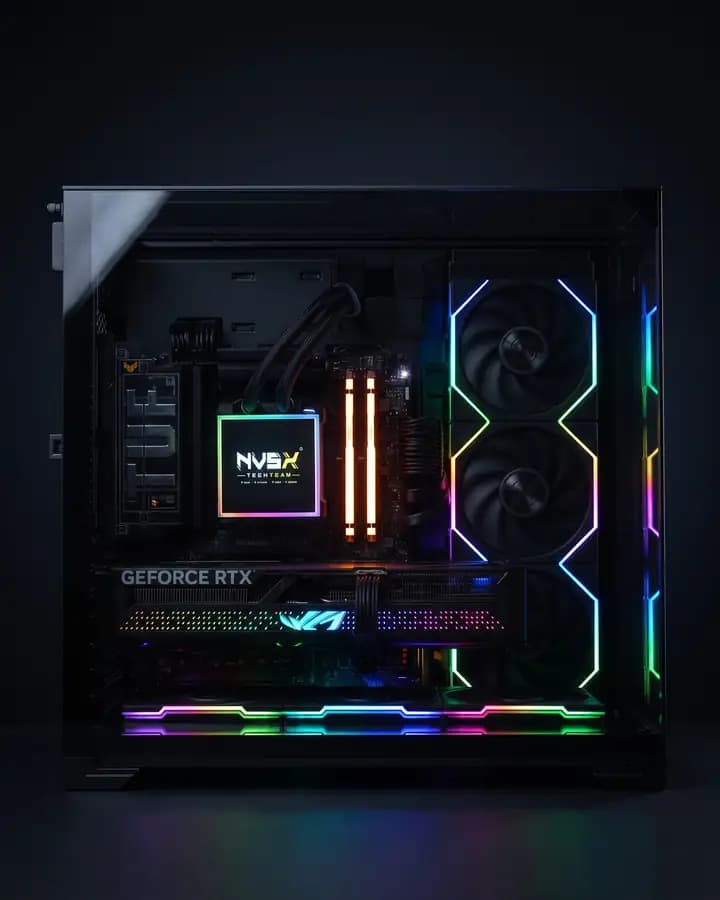
Pictured: a PC we built in Sep 2026 with this processor, graphics card and memory, and a 2 TB SSD.
RTX 5060 Ti, 16 GBPlays effects smoothly and speeds up exports.Makers ask: 8 GB of graphics memory (Adobe)
Memory
32 GB DDR5Holds your timeline. Longer 4K projects need more.Makers ask: 16 GB for HD, 32 GB or more for 4K (Adobe)
Processor
Ryzen 7 9700X, 8 coresDecodes your footage and helps exports along.Makers ask: AMD Ryzen 3000 series or newer (Adobe)
Storage
2 TB SSD, plus a second drive for footageFast drives keep playback smooth.Makers ask: A fast SSD for the app and cache, plus a fast drive for media (Adobe)
NVIDIA: GeForce RTX 5060 Ti and RTX 5070 Ti specifications
AMD: Ryzen 7 9700X specifications (8 cores, up to 5.5 GHz)
Prices: NVSX quotes since June 2026, GST included, parts and assembly in.
Video editing PC
Our starting editing build, about₹2.0 lakh
Not a fixed price for its exact parts: the middle of the 84 creator PCs we quoted with an RTX 5060 Ti 16 GB since June 2026. GST included.
Step up
RTX 5070 Ti, 16 GB Faster effects and exports₹2.6–4.0 lakh
Creator PCs we quoted with that card. The processor, memory and storage you pick set where in the range you land.
Most editing PCs we quote come to about ₹2.0 lakh.
Stress-tested on our bench before it ships
PNY’s RTX 5060 Ti 16 GB, the make in the PC pictured. Yours depends on stock.
What the card does for editors
Besides its 16 GB, the card has its own video engines. NVIDIA says Premiere Pro uses them to speed up exports and playback.
Graphics memory
16 GB GDDR7
For exports
One ninth-generation NVENC encoder, AV1 included
For playback
One sixth-generation NVDEC decoder
Camera footage
On RTX 50 cards, Premiere Pro decodes 10-bit 4:2:2 H.264 and HEVC on the card (Windows 11)
NVIDIA: GeForce RTX 5060 Ti specifications, and its post of 2 Apr 2025 on 4:2:2 in Premiere Pro.
Professional-Grade Video Editing With GeForce RTX 50 SeriesNVIDIA Studio · YouTube
A PC for 3D rendering.
Blender’s Cycles, Redshift and Unreal render on the graphics card, and its memory sets how big a scene fits. Buy the most graphics memory your budget allows.
For Blender, Cinema 4D with Redshift, and Unreal Engine.
Pictured: a PC we built in Oct 2026 around the same RTX 5060 Ti 16 GB, with a 16-core Ryzen 9 9950X and 64 GB of memory.
Rendering score44,294
Tested on our bench: CPU 70 °C, GPU 70 °C at full load
RTX 5060 Ti, 16 GBRenders the frames. Its memory decides how big a scene fits.Makers ask: 8 GB (Blender, Unreal Engine 5); 12 GB recommended for Redshift (Maxon)
Memory
32 GB DDR5Holds the scene, its textures and simulations.Makers ask: 32 GB recommended (Blender, Unreal Engine 5)
Processor
Ryzen 7 9700X, 8 coresRendering on the processor and simulations use every core.Makers ask: 8 cores recommended (Blender)
Storage
2 TB SSDAsset libraries and caches open faster.Makers ask:Blender’s list gives no storage figure
Where these figures come from
Blender: hardware requirements, blender.org (Windows and Linux, recommended)
Epic Games: Unreal Engine 5.8 hardware and software specifications (recommended)
Maxon: system requirements for Maxon products (Redshift)
NVIDIA: GeForce RTX 5060 Ti, RTX 5070 Ti and RTX 5090 specifications
Prices: NVSX quotes since June 2026, GST included, parts and assembly in.
3D rendering PC
Our starting 3D build, about₹2.0 lakh
Not a fixed price for its exact parts: the middle of the 84 creator PCs we quoted with an RTX 5060 Ti 16 GB since June 2026. GST included.
Step up
RTX 5070 Ti, 16 GB Renders faster, but the same 16 GB: no bigger scenes₹2.6–4.0 lakh
RTX 5090, 32 GB Twice the graphics memory, for bigger scenes₹8.5–12.5 lakh
RTX 5070 Ti: creator PCs we quoted with that card. RTX 5090: the range of the RTX 5090 builds on our Custom PCs page, which pair it with a 16-core Ryzen 9 and 64 GB of memory.
Most 3D PCs we quote come to about ₹2.3 lakh. 3D buyers more often choose a 12- or 16-core Ryzen 9.
Stress-tested on our bench before it ships
An RTX 5090 32 GB: this one is MSI’s Gaming Trio. The make depends on stock.
How much scene each card holds
Memory sets how big a scene fits. The RTX 5070 Ti adds cores, not memory; the RTX 5090 doubles the memory.
RTX 5060 Ti16 GB 4,608 CUDA cores
RTX 5070 Ti16 GB 8,960 CUDA cores
RTX 509032 GB 21,760 CUDA cores
Bars: graphics memory. CUDA cores are NVIDIA’s processing cores.
NVIDIA: GeForce RTX 5060 Ti, RTX 5070 Ti and RTX 5090 specifications.
A PC for CAD.
Autodesk’s processor advice is about speed: 3 GHz or more (4 GHz turbo) for AutoCAD, and the highest single-core speed you can get for Revit. SOLIDWORKS asks for a graphics card from its certified list.
For AutoCAD, Revit and SOLIDWORKS.
Pictured: a PC we built in Sep 2026 with this processor, the RTX 5060 Ti 16 GB, 32 GB of memory and a 1 TB SSD, in a Thermaltake The Tower 300 case.
Tested on our bench: CPU 77 °C, GPU 76 °C at full load
Ryzen 7 9700X, up to 5.5 GHzRuns the modelling. Autodesk’s advice is about its speed.Makers ask: 3 GHz or more, 4 GHz turbo (AutoCAD 2026); highest single-core speed (Revit 2026)
Graphics card
RTX 5060 Ti, 16 GB; an RTX PRO card for SOLIDWORKSDraws the model as you turn and zoom it.Makers ask: 8 GB, DirectX 12 (AutoCAD 2026); a certified card and driver (SOLIDWORKS)SOLIDWORKS’ certified list has professional cards such as NVIDIA RTX PRO, and no GeForce gaming cards.
Memory
32 GB DDR5Big assemblies and drawings live here.Makers ask: 32 GB recommended (AutoCAD 2026, SOLIDWORKS); 32 GB for Revit models up to about 600 MB
Storage
1 TB SSDBig files and the app open faster.Makers ask: SSD recommended (AutoCAD 2026, SOLIDWORKS)
Rendering in Enscape, Lumion, Twinmotion or D5? They lean on the graphics card. Chaos recommends 8 GB of graphics memory for Enscape on large projects, Lumion 10 GB for complex projects, and Epic 12 GB for large Twinmotion scenes; the RTX 5060 Ti’s 16 GB clears all three. D5 Render recommends 32 GB of memory, as in this build.
Where these figures come from
Autodesk: system requirements for AutoCAD 2026, and for Revit 2026 (the 32 GB "Value" setup)
Dassault Systèmes: SOLIDWORKS system requirements, and its hardware certification list
AMD: Ryzen 7 9700X specifications (8 cores, up to 5.5 GHz)
Chaos: Enscape system requirements; Lumion: which graphics card you need for Lumion 2024 and newer; Epic Games: Twinmotion hardware and software specifications; D5 Render: system requirements
Prices: NVSX quotes since June 2026, GST included, parts and assembly in.
CAD PC
Our starting CAD build, about₹2.0 lakh
Not a fixed price for its exact parts: the middle of the 84 creator PCs we quoted with an RTX 5060 Ti 16 GB since June 2026. GST included.
Step up
NVIDIA RTX PRO card On SOLIDWORKS’ certified listPriced in your quote
RTX PRO cards are sourced to order, so the quote carries the day’s price.
Most CAD PCs we quote come to about ₹1.9 lakh. Some CAD buyers choose the 8 GB RTX 5060, which still meets AutoCAD’s 8 GB.
Stress-tested on our bench before it ships
AMD Ryzen 7 9700X, the processor in the PC pictured.
Processor speed, next to AutoCAD’s ask
Autodesk’s advice is about speed, so here is the Ryzen 7 9700X next to AutoCAD 2026’s figures.
AutoCAD 2026 asks for4 GHz turbo; 3 GHz or more at base
Ryzen 7 9700X5.5 GHz top boost; 3.8 GHz at base, 8 cores
Bars: top speed, on a scale to 6 GHz.
AMD: Ryzen 7 9700X specifications. Autodesk: AutoCAD 2026 system requirements.
Creator builds we shipped.
Real machines with 32 GB of memory or more, each one stress-tested before it shipped. The score is Cinebench R23, Maxon’s test of rendering on the processor: higher is faster.
Answered the way we would on the phone. If yours isn’t here, put it in your quote request.
Can a gaming PC do video editing and 3D?
Mostly, yes: the same parts do both. Blender lists GeForce cards among the ones its Cycles renderer runs on, and an RTX 5060 Ti 16 GB has twice the 8 GB of graphics memory Adobe recommends for Premiere Pro. What changes is the balance: more memory for long timelines, more graphics memory for big scenes. SOLIDWORKS is the exception: its certified list has no GeForce cards.
How much memory do I need for 4K editing?
Adobe recommends 16 GB for HD and 32 GB or more for 4K in Premiere Pro. Long timelines, or After Effects open alongside, are the reason to go higher.
How much graphics memory do I need for Blender?
Blender recommends 8 GB, and Maxon recommends 12 GB for Redshift. The bigger the scene, the more you want: the RTX 5060 Ti 16 GB and RTX 5070 Ti have 16 GB, the RTX 5090 has 32 GB.
Do I need an RTX PRO (Quadro) card?
For SOLIDWORKS, yes: its certified list has professional cards such as NVIDIA RTX PRO, and no GeForce cards. For Premiere Pro and Blender, a GeForce RTX card does the job. AutoCAD’s own page asks for a workstation-class card only for large datasets, point clouds and 3D modelling. RTX PRO cards are sourced to order, at the day’s price in your quote.
What does an editing, 3D or CAD PC cost?
Most come to about ₹2.0 lakh for editing, ₹2.3 lakh for 3D and ₹1.9 lakh for CAD: the middle of the 177 we quoted since June 2026, GST included. With an RTX 5070 Ti, creator PCs ran ₹2.6–4.0 lakh. Builds start from ₹1.5 lakh, and we quote any budget.
How long does a build take?
Your quote comes on WhatsApp, usually the same day. Once you pay the 50% advance, your parts are locked at the quoted price and you get the dispatch date in writing. If that date can’t work for you, we say so before you pay.
Do you have editing PCs ready to ship?
No shelf stock: every PC is built to your order, so the parts and the stress test are for your machine.
I’m not in Pune. Can you still build it?
Yes. Insured courier anywhere in India, the same 3-year service warranty, and in the first 30 days we pay shipping both ways for any fix. In Pune, delivery to your door is free.
What does the warranty cover?
A 3-year service warranty: labour, diagnosis and claim handling are free for 3 years. Parts are covered by each maker’s warranty, which is yours because every part is on a GST invoice in your name.
What isn’t covered?
Software, Windows and viruses, and lost data. Monitors and other peripherals, which carry their own brand’s warranty. Damage from impact, power surges or liquid, and changes made without asking us.
Can I pay in EMI?
Yes, on a card: pay by card and your own bank can convert it to EMI. You can also pay by UPI or bank transfer.
I train AI models too. Which page is for me?
If AI is the main job, such as training models or running local LLMs, see AI workstations. If it is a side task next to editing or 3D, say so in your quote request: graphics memory is the part both lean on.
Tell us your software. We’ll tell you what it needs.
Which part your work leans on, what your budget buys today, and where more money stops helping. Free, itemised, usually the same day. No follow-up calls unless you ask for one.
Tell us Your software and budget
Your quote On WhatsApp
Confirm Pay 50% to confirm, the rest before dispatch